


| AirPlay Compatible | Yes |
| Download Link | App Store |
| Website | https://www.primevideo.com |
Amazon Prime is a premium OTT streaming platform where you can stream blockbuster movies, series, TV shows, and more. Since the app comes up with built-in AirPlay support, you can AirPlay the video content directly from the Amazon Prime app to your Apple or AirPlay 2 compatible TVs. Apart from the smartphone, you can also AirPlay Amazon Prime from your MacBook to the smart TV. By following this article, you will learn how to AirPlay Amazon Prime from your iPhone, iPad, and Mac to the Apple TV and AirPlay 2 compatible TV.
Note: Those finding WiFi connectivity issues can rely on the Digital AV adapter to screen mirror Amazon Prime.
How to AirPlay Amazon Prime Using iPhone and iPad
Before jumping into the steps, turn on AirPlay on Apple TV. If you’re an Android TV user, you must turn on the AirPlay on Android TV. On the other hand, connect your iPhone and Apple TV or AirPlay 2 compatible smart TV to the same WiFi network.
1. Install the Amazon Prime app from the App Store on your device.
2. Next, open the Amazon Prime app and sign in with the login credentials with a valid subscription.
3. Once the home screen appears, click on the title you want to stream.
4. When the video starts playing, click the AirPlay icon at the top of the Amazon Prime app.

5. It will search for nearby devices. Select your AirPlay 2-enabled Smart TV or Apple TV from the available devices.
6. If prompted, enter the AirPlay Code displayed on the TV screen.
Once you have finished streaming, disable AirPlay on your iPhone to stop sharing the screen with your Apple TV/Smart TV.
How to AirPlay Amazon Prime Using Mac
1. Connect your AirPlay 2 compatible smart TV or Apple TV and Mac to the same WiFi network.
2. Visit the Amazon Prime official website and log into your account.
3. Once you see the library, select a movie or a TV show you want to stream.
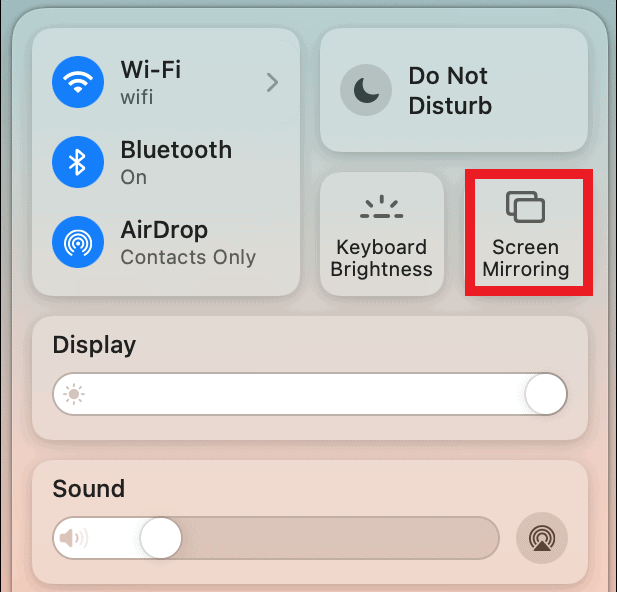
4. While playing, click the Control Center icon and select the Screen Mirroring option.
5. Select your TV name from the list of devices.
6. Now, it will play the selected video on your TV screen.
You can stop AirPlay on your Mac when you finish streaming Amazon Prime on your TV.
How to AirPlay Amazon Prime Without WiFi
This method requires an HDMI cable, a Lightning Digital AV Adapter for iPhone, and a USB-C Digital AV Multiport Adapter for MacBook.
1. Connect the Digital AV Adapter to the power source using the USB-C power cable.
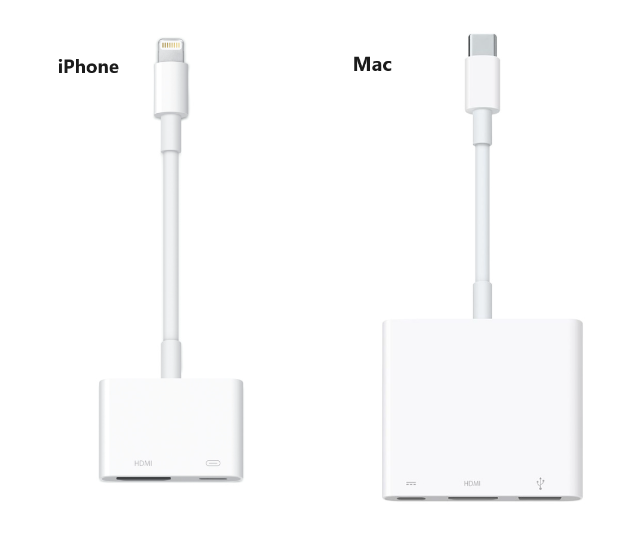
2. Now, connect the Digital AV Adapter to the charging port on your Mac and iPhone.
3. Connect the HDMI cable from the adapter to the TV.
4 Now, change the input on your TV to view your iPhone/Mac’s screen.
5. Finally, play the Amazon Prime content to stream it on your smart TV.
How to Fix AirPlay Not Working With the Amazon Prime App
Currently, many users have complained that Prime AirPlay is not working on their Smart TVs. They may face issues like the app crashing out suddenly, an audio block, or the AirPlay icon missing on the app. The possible reasons for these errors could be the outdated app, poor internet connection, or signal blockage.
To resolve these issues, we recommend some simple troubleshooting solutions.
- Restart your WiFi router.
- Update the Amazon Prime app.
- Move your AirPlay-connected devices to a closer distance.
Still not working? Then, you can contact the Amazon Prime customer support team to resolve the problem.
FAQ
If it shows a black screen on Amazon Prime, it may have corrupted cache files within the app. In this case, you should uninstall and reinstall the app to clear the cache.
Yes, you can AirPlay Britbox on Prime.
